PowerShell script to find all maintenance windows in an SCCM environment:
Showing posts with label SCCM. Show all posts
Showing posts with label SCCM. Show all posts
Wednesday, July 24, 2024

Wednesday, December 7, 2022
Setting Peer Download options for SCCM boundary groups using Powershell
If you have more than just a few boundary groups you have probably wanted a way to quickly set these options across all of them. I suggest setting the options for your VPN boundary group(s) first. For VPN you probably want to prefer cloud based sources and not use peer downloads at all (to prevent peering with internal computers). Once you have that set then you can run this little gem to set all of the others for what I believe is the best settings. Of course you can modify it if you think other settings are best.
Here you go:
<#
.Synopsis
Set SCCM Boundary Group Peer Cache options to Allow peer cache downloads within this Boundary Group but restrict downloads to peers within the same subnet.
.DESCRIPTION
Use this in order to quickly change the peer cache options for a set of boundary groups. The more boundary groups you have
in your organization, the more beneficial this becomes.
The flags (at time of writing) that you will see in the boundary groups are:
0 - Allow peer downloads in this boundary group (only first check box is checked)
1 - Do not allow peer downloads in this boundary group (no check boxes are checked)
2 - Allow peer downloads in this boundary group but During peer downloads only use peers within the same subnet (first two check boxes are checked)
9 - Prefer cloud based sources over on-premises sources and Do not allow peer downloads in this boundary group (only last check box is checked)
I have not experimented to find out what results come from other combinations of check-boxes.
#>
#Change testmode to false to save the changes
$testmode=$false
#The Configuration Manager site code
$sitecode="ABC"
#The Configuration Manager Primary Server
$SMSProvider="SCCMserver.domain.com"
#the flag you want to set
$newflag=2
$BoundaryGroups = (get-wmiobject -Namespace root\sms\site_$sitecode -Class SMS_BoundaryGroup -computername $SMSProvider) | Where-Object {($_.Flags -NE 2) -and ($_.Flags -le 2)}
Foreach ($BoundaryGroup in $BoundaryGroups) {
write-host "Setting $($BoundaryGroup.name) flags to $newflag (previously $($BoundaryGroup.flags))"
$BoundaryGroup.Flags = $newflag
Try {
If (-not $testmode) {
$result=$BoundaryGroup.Put()
write-host "saved" -ForegroundColor green
}
} Catch {
write-host "failed to set flag" -ForegroundColor red
}
}
Thursday, December 1, 2022
Controlling SCCM bandwidth Utilization
There are four items that control network bandwidth utilization within SCCM:
- BITS client setting – The download of data
from the distribution point to the client is a BITS download. In the
client settings of the clients the rate of those downloads can be
adjusted. However, this is client side and does not know about
bandwidth on the network so if enough clients, even if all configured to
1Mbps, are trying to download at the same time it can still clog the WAN.
https://learn.microsoft.com/en-us/mem/configmgr/core/clients/deploy/about-client-settings#background-intelligent-transfer-service-bits
I recommend setting the BITS settings but to something that will work for your organization. Exactly what that is varies greatly from one organization to another. - Rate Limit Schedules – Set in the Distribution Point properties, this controls
maximum data that can be sent to each distribution point at any given time of
day. This is to prevent WAN saturation while getting the data onto the distribution points prior to deployment to clients.
https://learn.microsoft.com/en-us/mem/configmgr/core/plan-design/hierarchy/manage-network-bandwidth#BKMK_PlanningForThrottling
I recommend setting the rate limits but to something that will work for your organization. Exactly what that is varies greatly from one organization to another. Remember that this is set individually for each distribution point.


- LEDBAT - Where BITS worked client side, LEDBAT works server side to control bandwidth usage. Like the throttling rate limits it
is enabled on each distribution point individually. The idea is that it dynamically adjusts
transfer rates so that clients only use network bandwidth when it's
available.
https://learn.microsoft.com/en-us/mem/configmgr/core/plan-design/hierarchy/fundamental-concepts-for-content-management#windows-ledbat
I recommend turning this on for every distribution point.

- Peer caching
technologies
– Peer caching takes at least a portion of the load off of the WAN by
allowing clients to share cached deployment data with each other. We
would limit this to only peers that are on the same subnet in order to
ensure that they are never going cross-WAN. There are three peer caching
technologies available in SCCM. Without going deep on all of them I
will just say that the on I recommend using is “Peer cache” for on-premises and Delivery Optimization for cloud (Intune). Yes, use both if you have both on-prem SCCM and Intune because Delivery Optimization gives no benefit to your Line-of-Business applications or anything else that is not delivered from Microsoft's global distribution network.
https://learn.microsoft.com/en-us/mem/configmgr/core/plan-design/hierarchy/fundamental-concepts-for-content-management#peer-caching-technologies
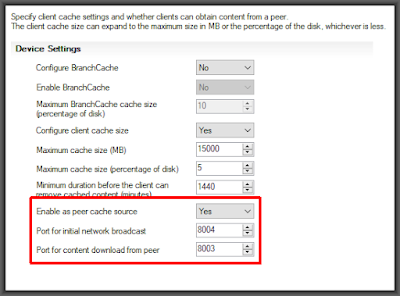
I suggest turning on Peer Cache for all non-VPN connected clients and enabling peer downloads, but limited to same subnet, on all non-VPN boundary groups.

Friday, September 22, 2017
Powershell script to create SCCM maintenance window collections based on an external source (CMDB)
As written this will download the external data from a URL but that is easily converted to a simple file copy (or completely removed) if a URL is not how you get your CMDB data. As always, don't just download and run stuff that you find on the internet, check it over for possible malicious code before you do anything with it. Enjoy!
-------------------------------------------------------------
Update-MWCollections.ps1
-------------------------------------------------------------
<#
-------------------------------------------------------------
-------------------------------------------------------------
-------------------------------------------------------------
Update-MWCollections.ps1
-------------------------------------------------------------
<#
.Synopsis
   Maintains Software Updates Maintenance Window Collections in SCCM
   based on information from an external source (CMDB)
.DESCRIPTION
   ***********************************************************
   Look for the "#User Variables" to make any necessry changes
   The script will not download a copy the CMDB information
   while in test mode (will use the test file).  It will,
   however, create maintenance windows on any collections that
   it creates so ensure that you only have test machines in
   your test file's data.
   ***********************************************************
   Downloads data from CMDB website and stores a local copy as a .csv
   Reads the CMDB data from the .csv into an array of objects
   Reads SCCM data directly from SCCM into an array of objects
   Loops through the array of CMDB objects, checking each against the SCCM objects
   Sets a count of SCCM maintenance windows collections to the number that the CMDB object belong to
   If the count of SCCM maintenance windows collections is more than 1,
     it removes the computer from all SCCM maintenance windows and sets the count to 0
   If the count of SCCM maintenance windows collections is exactly 1,
     it checks to ensure that the one maintenance window collection to which the computer belongs is correct
     if it is not correct it removes the computer from its current collection and sets the count to 0
   If the count of SCCM maintenance windows collections is 0,
     it checks to see if the correct maintenance window collection exists, if not it creates it
     it adds the computer to the correct maintenance window collection
.NOTES
   Created by Mark Randol - randoltech.blogspot.com
#>

function Get-OccuranceOfDayOfWeek{
    [CmdletBinding(DefaultParameterSetName='OccuranceOfDayOfWeek',
                  SupportsShouldProcess=$true,
                  PositionalBinding=$false)]
    [OutputType([DateTime])]
    Param(
        # Day of the Week
        [Parameter(Mandatory=$true,
                   ValueFromPipeline=$true,
                   ValueFromPipelineByPropertyName=$true,
                   ValueFromRemainingArguments=$false,
                   Position=0,
                   ParameterSetName='OccuranceOfDayOfWeek')]
        [ValidateNotNull()]
        [ValidateNotNullOrEmpty()]
        [ValidateLength(0,15)]
        [ValidateSet("Sunday", "Monday", "Tuesday", "Wednesday", "Thursday", "Friday", "Saturday")]
        [Alias("day","dayname","dow")]
        [String]
        $DayOfWeek,

        # Occurance
        [Parameter(Mandatory=$true,
                   ValueFromPipeline=$true,
                   ValueFromPipelineByPropertyName=$true,
                   ValueFromRemainingArguments=$false,
                   Position=1,
                   ParameterSetName='OccuranceOfDayOfWeek')]
        [ValidateNotNull()]
        [ValidateNotNullOrEmpty()]
        [ValidateSet(1,2,3,4)]
        [Alias("occ")]
        [Int]
        $Occurance
    )
    Begin{
    }
    Process{
        [Int]$TestDayNum = 0
        [Arr]$OccuranceDates = @()
        do
        {
            $TestDayNum = $TestDayNum + 1
            $TestDayName = (Get-Date -Day $TestDayNum).DayOfWeek
        }
        until ($TestDayName -eq $DayOfWeek)
        $OccuranceDate = $TestDayNum
        do{
            $OccuranceDates += @($OccuranceDate)
            $OccuranceDate = $OccuranceDate + 7
        }
        while ($OccuranceDate -lt 32)
    }
    End{
        [Int]$OutputInt = $Occurance - 1
        [DateTime]$MyOutput = (Get-Date -Year (Get-Date).Year -Month (Get-Date).Month -Day $OccuranceDates[$OutputInt]).Date
        Return $MyOutput
    }
}

function Add-SCCMArrayMember{
    [CmdletBinding(DefaultParameterSetName='CollectionMembership',
                  SupportsShouldProcess=$true,
                  PositionalBinding=$false)]
    [OutputType([object])]
    Param(
        [Parameter(Mandatory=$true,
                   ValueFromPipelineByPropertyName=$true,
                   Position=0,
                   ParameterSetName='CollectionMembership')]
        [string]$MaintenanceWindow,

        [Parameter(Mandatory=$true,
                   ValueFromPipelineByPropertyName=$true,
                   Position=1,
                   ParameterSetName='CollectionMembership')]
        [string]$CollectionID,

        [Parameter(Mandatory=$true,
                   ValueFromPipelineByPropertyName=$true,
                   Position=2,
                   ParameterSetName='CollectionMembership')]
        [string]$ComputerName,

        [Parameter(Mandatory=$true,
                   ValueFromPipelineByPropertyName=$true,
                   Position=3,
                   ParameterSetName='CollectionMembership')]
        [string]$ResourceID
    )
    Begin{
        $CollectionMembership = new-object PSObject
    }
    Process{
        $properties = @{'MaintenanceWindow'=$MaintenanceWindow;
                        'CollectionID'=$CollectionID;
                        'ComputerName'=$ComputerName;
                        'ResourceID'=$ResourceID}
        $CollectionMembership = New-Object -Property $properties -TypeName PSObject
    }
    End{
        return $CollectionMembership
    }
}

function Add-CMDBArrayMember{
    [CmdletBinding(DefaultParameterSetName='CMDBArrayMember',
                  SupportsShouldProcess=$true,
                  PositionalBinding=$false)]
    [OutputType([object])]
    Param(
        [Parameter(Mandatory=$true,
                   ValueFromPipelineByPropertyName=$true,
                   Position=0,
                   ParameterSetName='CMDBArrayMember')]
        [string]$MaintenanceWindow,

        [Parameter(Mandatory=$true,
                   ValueFromPipelineByPropertyName=$true,
                   Position=1,
                   ParameterSetName='CMDBArrayMember')]
        [string]$ComputerName
    )
    Begin{
        $Membership = new-object PSObject
    }
    Process{
        $properties = @{'MaintenanceWindow'=$MaintenanceWindow;
                        'ComputerName'=$ComputerName}
        $Membership = New-Object -Property $properties -TypeName PSObject
    }
    End{
        return $Membership
    }
}

function Create-NewSCCMMWCollection{
    [CmdletBinding(DefaultParameterSetName='NewSCCMMWCollection',
                  SupportsShouldProcess=$true,
                  PositionalBinding=$false)]
    [OutputType([object])]
    Param(
        [Parameter(Mandatory=$true,
                   ValueFromPipelineByPropertyName=$true,
                   Position=0,
                   ParameterSetName='NewSCCMMWCollection')]
        [string]$CollectionName,

        [Parameter(Mandatory=$true,
                   ValueFromPipelineByPropertyName=$true,
                   Position=1,
                   ParameterSetName='NewSCCMMWCollection')]
        [string]$TargetFolderID,

        [Parameter(Mandatory=$true,
                   ValueFromPipelineByPropertyName=$true,
                   Position=2,
                   ParameterSetName='NewSCCMMWCollection')]
        [string]$Schedule,

        [Parameter(Mandatory=$true,
                   ValueFromPipelineByPropertyName=$true,
                   Position=3,
                   ParameterSetName='NewSCCMMWCollection')]
        [string]$LimitingCollectionID,


        [Parameter(Mandatory=$true,
                   ValueFromPipelineByPropertyName=$true,
                   Position=4,
                   ParameterSetName='NewSCCMMWCollection')]
        [int]$MaintDuration,

        [Parameter(Mandatory=$true,
                   ValueFromPipelineByPropertyName=$true,
                   Position=5,
                   ParameterSetName='NewSCCMMWCollection')]
        [string]$DeploymentCollectionID,

        [Parameter(Mandatory=$true,
                   ValueFromPipelineByPropertyName=$true,
                   Position=5,
                   ParameterSetName='NewSCCMMWCollection')]
        [string]$SiteCode
    )
    Begin{
    }
    Process{
        #Create the collection
        $ActivityMessage = "Adding new SCCM Maintenance Window collection " + $CollectionName
        $StatusMessage = "Creating collection named " + $CollectionName
        Write-Output $StatusMessage
        $newColl = New-CMDeviceCollection -Name $CollectionName -limitingcollectionid $LimitingCollectionID -RefreshType Continuous #Create the collection
        $NewCollectionID = $($newColl).collectionid
        $NewCollectionName = $($newColl).Name

        #Move the to the correct folder
        $CurrentFolderID = 0
        $ObjectTypeID = 5000
        $StatusMessage = "Moving " + $NewCollectionName + " to Maintenance Windows Folder"
        Write-Progress -Activity $ActivityMessage -Status $StatusMessage
        Write-Output $StatusMessage
        $Namespace = "Root\SMS\Site_" + $SiteCode
        Invoke-WmiMethod -Namespace $Namespace -Class SMS_objectContainerItem -Name MoveMembers -ArgumentList $CurrentFolderID,$NewCollectionID,$ObjectTypeID,$TargetFolderID

        #Put a maintenance window on the collection
        #Turn the schedule variable into a comma delimited array
        $CommaDelimitedSchedule = $Schedule.Replace("st-",",").Replace("nd-",",").Replace("rd-",",").Replace("th-",",").Replace("st&","").Replace("nd&","").Replace("rd&","").Replace("th&","").Replace("@",",").Replace("-",",")
        #Initialize variables from the array contents
        $WeekOrderStr = $CommaDelimitedSchedule.Split(',')[0]
        $DayOfWeek = $CommaDelimitedSchedule.Split(',')[1]
        $StartTimeStr = $CommaDelimitedSchedule.Split(',')[2]
        $StartHour = Get-Date $schedule.split('@')[1]
        [Int]$WeekOrder = 0
        $EndTime = $StartTime.AddHours($maintDuration)
        if ($WeekOrderStr -eq "every"){
            $WeekOrder = 0 #Set up for every week
            $MWWindowName = "$prefix $WeekOrderStr-$DayOfWeek@$StartTimeStr"
            $StatusMessage = "Adding $MWWindowName to collection " + $NewCollectionName
            Write-Progress -Activity $ActivityMessage -Status $StatusMessage
            Write-Output $StatusMessage
            IF ($DayOfWeek -eq "Day" -or $DayOfWeek -eq "day"){ #schedule is every day
                $StartTime = ((get-date -Day 1).Date).AddHours($StartHour.Hour)
                $EndTime = $StartTime.AddHours($maintDuration)
                $StatusMessage = "Adding $MWWindowName to collection " + $NewCollectionName
                Write-Progress -Activity $ActivityMessage -Status $StatusMessage
                Write-Output $StatusMessage
                $schedtoken = New-CMSchedule -Start $StartTime -End $EndTime -RecurInterval Days -RecurCount 1
                New-CMMaintenanceWindow -CollectionID $NewCollectionID -Name $MWWindowName -Schedule $schedtoken
            } #schedule is every day
            else{ #schedule is one day of week
                $StartTime = (Get-OccuranceOfDayOfWeek -DayOfWeek $DayOfWeek -Occurance 1).AddHours($StartHour.Hour)
                $EndTime = $StartTime.AddHours($maintDuration)
                $StatusMessage = "Adding $MWWindowName to collection " + $NewCollectionName
                Write-Progress -Activity $ActivityMessage -Status $StatusMessage
                Write-Output $StatusMessage
                $schedtoken = New-CMSchedule -DayOfWeek $DayOfWeek -Start $StartTime -End $EndTime -RecurCount 1
                New-CMMaintenanceWindow -CollectionID $NewCollectionID -Name $MWWindowName -Schedule $schedtoken
            } #schedule is one day of week
        }
        else {
            $WeekOrder = $WeekOrderStr.Substring(0,1) #Set up for the week in the 1st character (monthly and fortnightly)
            $StartTime = (Get-OccuranceOfDayOfWeek -DayOfWeek $DayOfWeek -Occurance $WeekOrder).AddHours($StartHour.Hour)
            $EndTime = $StartTime.AddHours($maintDuration)
            $MWWindowName = $prefix + (($WeekOrderStr.Substring(0,1)).replace("1","1st").replace("2","2nd")).replace("3","3rd").replace("4","4th") + "-$DayOfWeek@$StartTimeStr"
            $StatusMessage = "Adding $MWWindowName to collection " + $NewCollectionName
            Write-Progress -Activity $ActivityMessage -Status $StatusMessage
            Write-Output $StatusMessage
            $schedtoken = New-CMSchedule -WeekOrder $WeekOrder -DayOfWeek $DayOfWeek  -Start $StartTime -End $EndTime
            New-CMMaintenanceWindow -CollectionID $NewCollectionID -Name $MWWindowName -Schedule $schedtoken
            if ($WeekOrderStr.Length -eq 2){
                $WeekOrder = $WeekOrderStr.Substring(1,1) #Set up for the week in the 2nd character (fortnightly)
                $StartTime = (Get-OccuranceOfDayOfWeek -DayOfWeek $DayOfWeek -Occurance $WeekOrder).AddHours($StartHour.Hour)
                $EndTime = $StartTime.AddHours($maintDuration)
                $MWWindowName = $prefix + (($WeekOrderStr.Substring(1,1)).replace("1","1st").replace("2","2nd")).replace("3","3rd").replace("4","4th") + "-$DayOfWeek@$StartTimeStr"
                $StatusMessage = "Adding $MWWindowName to collection " + $NewCollectionName
                Write-Progress -Activity $ActivityMessage -Status $StatusMessage
                Write-Output $StatusMessage
                $schedtoken = New-CMSchedule -WeekOrder $WeekOrder -DayOfWeek $DayOfWeek  -Start $StartTime -End $EndTime
                New-CMMaintenanceWindow -CollectionID $NewCollectionID -Name $MWWindowName -Schedule $schedtoken
            }
        }

        #Include the collection in the deployment collection membership
        $StatusMessage = "Adding " + $NewCollectionName + " as an include to the deployment collection"
        Write-Progress -Activity $ActivityMessage -Status $StatusMessage
        Write-Output $StatusMessage
        Add-CMDeviceCollectionIncludeMembershipRule -CollectionId $DeploymentCollectionID -IncludeCollectionId $NewCollectionID
    }
    End{
    }
}

function Remove-AllCurrentMWMembership{
    [CmdletBinding(DefaultParameterSetName='AllCurrentMWMembership',
                  SupportsShouldProcess=$true,
                  PositionalBinding=$false)]
    [OutputType([int])]
    Param(
        [Parameter(Mandatory=$true,
                   ValueFromPipelineByPropertyName=$true,
                   Position=0,
                   ParameterSetName='AllCurrentMWMembership')]
        [string]$ComputerName,

        [Parameter(Mandatory=$true,
                   ValueFromPipelineByPropertyName=$true,
                   Position=1,
                   ParameterSetName='AllCurrentMWMembership')]
        [string]$SiteServerName,

        [Parameter(Mandatory=$true,
                   ValueFromPipelineByPropertyName=$true,
                   Position=2,
                   ParameterSetName='AllCurrentMWMembership')]
        [string]$SiteCode,

        [Parameter(Mandatory=$true,
                   ValueFromPipelineByPropertyName=$true,
                   Position=3,
                   ParameterSetName='AllCurrentMWMembership')]
        [string]$Prefix

    )

    Begin{
        $NameSpace = "root\SMS\site_" + $SiteCode
        $QueryText = "SELECT SMS_Collection.* FROM SMS_FullCollectionMembership, SMS_Collection where name = '" + $ComputerName + "' and SMS_FullCollectionMembership.CollectionID = SMS_Collection.CollectionID and SMS_FullCollectionMembership.CollectionName like '" + $Prefix + "%'"
    $Collections = Get-WmiObject -Query $QueryText -Namespace $NameSpace
    }
    Process{
        foreach ($Collection in $Collections){
            $CollectionName = $Collection.name
            $ActivityMessage = “Removing computer from a collection.”
            $StatusMessage = “Removing $ComputerName from $CollectionName”
            Write-Output $StatusMessage
            Write-Progress -Activity $ActivityMessage -Status $StatusMessage
            Remove-CMCollectionDirectMembershipRule -CollectionName $CollectionName -ResourceName $ComputerName -Force
        }
    }
    End{
    }
}

Import-Module -Name "$(split-path $Env:SMS_ADMIN_UI_PATH)\ConfigurationManager.psd1" #Load the Configuration Manager Module

#Initialize program variables
    $Date = Get-Date -Format yyyy-MM-dd_HHmm
    $StartTime = Get-Date
    $SCCMMWTable = @([pscustomobject])
    $CMDBMWTable = @([pscustomobject])
    [Int]$OuterLoopCounter = -1
    [Int]$MainCounter = -1
    [Int]$InnerLoopCounter = -1

#User Variables
    $TestMode = $true #Set to $false to run production - provides quick and easy switch to/from test mode.
    $SiteCode = "SIT"
    $SiteServer = "siteserver.yourdomain.org"
    $WorkingFolder = "D:\Folder\Sub-Folder" #What is our main folder to work with.  This just keeps things clean and stops stuff from ending up in places like C:\
    $LogFolder = $WorkingFolder + "\Logs" #Where to put our logs
    $CMDBDownloadURL = "https://sum.dum.url"
    $ProxyServerURL = "http://proxyserver.yourdomain.org:8015"
    $LogFile = $LogFolder + "\Update-SUPMWCollections." + $Date + ".log" #Where to put the log file and what to name it.
    $LocalCMDBpathProd = $WorkingFolder + "\CMDBData.$Date.csv" #production - we download to this file and then work with it locally
    $LocalCMDBpathTest = $WorkingFolder + "\CMDBData.Test.csv" #test - for testing use this instead of the downloaded file to speed things up
    $CMDBExportPath = $LogFolder + "\CMDBMWs." + $Date + ".csv" #Where to put the CMDB reference list. This is so we can check the scripts work later.
    $PreChangeExportPath = $LogFolder + "\Pre-UpdateMWs." + $Date + ".csv" #Where to put the MW reference list before changes have been made.  This is so we can check the scripts work later.
    $PostChangeExportPath = $LogFolder + "\Post-UpdateMWs." + $Date + ".csv" #Where to put the MW reference list after changes have been made  This is so we can check the scripts work later.
    $DeploymentCollectionIDProd = "SIT12345" #Production - ID of the collection to which the software updates are actually deployed.  Maintenance window collections are "include" collections on this collection.
    $DeploymentCollectionIDTest = "SIT23456" #Testing - ID of the collection to which the software updates are actually deployed.  Maintenance window collections are "include" collections on this collection.
    $PrefixTest = "Software Updates Maintenance Window (TEST) - " #Test - Prefix for new software update collections when created
    $PrefixProd = "Software Updates Maintenance Window (PROD) - " #Prefix for new software update collections when created
    $MWFolderID = 12345678 #The ID of the folder in SCCM where you would like these collections to reside, otherwise they will all end up in the root folder of your console and make it all ugly
    $LimitingCollectionID = "SIT34567" #Limiting collection for new software update collections when created - usually all systems but could be something more limiting like all SCCM clients
    $MaintDuration = 2 #How long do you want your software updates maintenance windows to be (in hours)

$location = $SiteCode + ":\"
set-location $SiteCode #Change to local instance of ConfigMgr
Start-Transcript -path ${LogFile}

if ($TestMode = $false){
    $LocalCMDBpath = $LocalCMDBpathProd
    $DeploymentCollectionID = $DeploymentCollectionIDProd
    $Prefix = $PrefixProd

    #Download the CMDB data file to local location
    $web = New-Object System.Net.WebClient
    $proxy = new-object System.Net.WebProxy
    $proxy.Address = $ProxyServerURL
    $proxy.useDefaultCredentials = $true #once we get access for the service account, this line can go away
    $web.Credentials = Get-Credential
    $web.proxy = $proxy
    $web.DownloadFile($CMDBDownloadURL,$LocalCMDBpath)
}
else {
    $LocalCMDBpath = $LocalCMDBpathTest
    $DeploymentCollectionID = $DeploymentCollectionIDTest
    $Prefix = $PrefixTest
}

#Import CMDB MW Data into an array of objects
$ActivityMessage = “Importing CMDB Data”
$StatusMessage = ""
Write-Progress -Activity $ActivityMessage
Write-Output "Importing CMDB Data"
$CMDBRawFile = Import-Csv -LiteralPath $LocalCMDBpath
$ActivityMessage = "Getting CMDB maintenance window information"
$StatusMessage = "Getting CMDB maintenance window information"
Write-Output $StatusMessage
Write-Progress -Activity $ActivityMessage -Status $StatusMessage
$LoopCounter = -1
foreach ($CMDBComputer in $CMDBRawFile){
    $LoopCounter++
    if ($CMDBComputer.sch_name -ne $null -and $CMDBComputer.sch_name -ne "" -and $CMDBComputer.win_host_name -ne $null -and $CMDBComputer.win_host_name -ne ""){
        $CMDBComputerName = ($CMDBComputer.win_host_name).ToUpper()
        $StatusMessage = "Importing information for computer $CMDBComputerName"
        $progress = (($LoopCounter / ($CMDBRawFile | Measure-Object).Count) * 100)
        Write-Progress -Activity $ActivityMessage -Status $StatusMessage -PercentComplete $progress
        $CMDBMWTable += Add-CMDBArrayMember -MaintenanceWindow $CMDBComputer.sch_name -ComputerName $CMDBComputerName
    }
}
$ActivityMessage = “Completed reading in the CMDB information”
$StatusMessage = "Completed reading in the CMDB information - writing the CMDB file."
Write-Output $StatusMessage
Write-Progress -Activity $ActivityMessage -Status $StatusMessage
$CMDBMWTable | Sort-Object -Property computername | Export-Csv -Path $CMDBExportPath -NoClobber -Encoding Default -NoTypeInformation

#Import SCCM data into an array of objects
$ActivityMessage = “Getting SCCM collection information”
$StatusMessage = "Getting SCCM collection membership data"
Write-Output $StatusMessage
Write-Progress -Activity $ActivityMessage -Status $StatusMessage
$IncludeRulesOfDeploymentCollection = Get-CMCollectionIncludeMembershipRule -CollectionId $DeploymentCollectionID
$OuterLoopCounter = -1
foreach ($IncludeRule in $IncludeRulesOfDeploymentCollection){
    $OuterLoopCounter++
    $SCCMCollectionID = $IncludeRule.IncludeCollectionID
    $SCCMCollectionName = (Get-CMDeviceCollection -Id $SCCMCollectionID).Name
    $SCCMMaintenanceWindow = $SCCMCollectionName.Replace($Prefix,"")
    $StatusMessage = "Importing membership information for collection $SCCMCollectionName which is an 'include' rule member of " + (Get-CMDeviceCollection -Id $DeploymentCollectionID).Name
    $progress = (($OuterLoopCounter / $IncludeRulesOfDeploymentCollection.Count) * 100)
    Write-Progress -Activity $ActivityMessage -Status $StatusMessage -PercentComplete $progress
    $SCCMIncludedCollectionMembers = Get-CMCollectionMember -CollectionId $SCCMCollectionID
    $InnerLoopCounter = -1
    foreach  ($member in $SCCMIncludedCollectionMembers){
        $InnerLoopCounter++
        $MainCounter++
        $SCCMMWTable += Add-SCCMArrayMember -MaintenanceWindow $SCCMMaintenanceWindow -CollectionID $SCCMCollectionID -ComputerName $member.Name -ResourceID $member.ResourceID
    }
}
$ActivityMessage = “Completed reading in the list of 'include' Collections from the Deployment Collection”
$StatusMessage = "Done getting SCCM collection membership information - writing the Pre-Change file."
Write-Output $StatusMessage
Write-Progress -Activity $ActivityMessage -Status $StatusMessage
$SCCMMWTable | Sort-Object -Property ComputerName | Export-Csv -Path $PreChangeExportPath -NoClobber -Encoding Default -NoTypeInformation

#Compare the two arrays of objects
$ActivityMessage = “Comparing the SCCM data to the CMDB data”
$StatusMessage = "Comparing the SCCM data to the CMDB data and making any necessary adjustments to SCCM"
Write-Output $StatusMessage
Write-Progress -Activity $ActivityMessage -Status $StatusMessage
$LoopCounter = -1
#Main comparison loop.  This is what will take the longest amount of time in the run cycle.
foreach  ($CMDBMWComputer in $CMDBMWTable){ #Check each computer in the CMDB
    $LoopCounter++
    $progress = (($LoopCounter / $CMDBMWTable.Count) * 100)
    $CountOfSCCMMWs = 0
    #Only continue if there is actually a computername in CMDB (yes, it happens)
    if ($CMDBMWComputer.ComputerName -ne $null -and $CMDBMWComputer.ComputerName -ne ""){
        $CountOfSCCMMWs = (($SCCMMWTable | ? { $_.computername -eq $CMDBMWComputer.ComputerName }) | Measure-Object).Count
        $CheckSCCMMW = ($SCCMMWTable | ? { $_.computername -eq $CMDBMWComputer.ComputerName })
        #Only continue if there is a maintenance window in CMDB (yeah, that happens too)
        if($CMDBMWComputer.MaintenanceWindow -ne $null -and $CMDBMWComputer.MaintenanceWindow -ne ""){
            #Only continue if the computer is also in SCCM
            $SCCMComputerObject = (Get-CMDevice -Name $CMDBMWComputer.ComputerName)
            if ($SCCMComputerObject){
                $StatusMessage = "Checking maintenance windows for " + $CMDBMWComputer.ComputerName
                Write-Progress -Activity $ActivityMessage -Status $StatusMessage -PercentComplete $progress
                #If the computer is in more than one maintenance window collection then remove it from all of them
                if ($CountOfSCCMMWs -gt 1){
                        $StatusMessage = $CMDBMWComputer.ComputerName + "`tis in multiple maintenance window collections."
                        Write-Progress -Activity $ActivityMessage -Status $StatusMessage -PercentComplete $progress
                        Write-Output $StatusMessage
                        Remove-AllCurrentMWMembership -ComputerName $CMDBMWComputer.ComputerName -SiteServerName $SiteServer -SiteCode $SiteCode -Prefix $Prefix
                        $CountOfSCCMMWs = 0 #Set the count to zero since the computer is now a member of no maintenance window collections
                } #End - If the computer is in more than one maintenance window collection then remove it from all of them and set the count to 0
                #If the computer is in only one maintenance window collection we need to check that it is the correct one
                if ($CountOfSCCMMWs -eq 1){
                    #If the computer is not in the correct maintenance window collection then remove it from the one that it is in and set the count to 0
                    if ($CMDBMWComputer.MaintenanceWindow -ne ($CheckSCCMMW.MaintenanceWindow).Replace($Prefix,"")){
                        $StatusMessage = $CMDBMWComputer.ComputerName + "`tis in the wrong maintenance window collection.`tSCCM collection = " + $CheckSCCMMW.MaintenanceWindow + "`tCMDB Maintenance Window = " + $CMDBMWComputer.MaintenanceWindow
                        Write-Progress -Activity $ActivityMessage -Status $StatusMessage -PercentComplete $progress
                        Write-Output $StatusMessage
                        Remove-AllCurrentMWMembership -ComputerName $CMDBMWComputer.ComputerName -SiteServerName $SiteServer -SiteCode $SiteCode -Prefix $Prefix
                        $CountOfSCCMMWs = 0 #Set the count to zero since the computer is now a member of no maintenance window collections
                    } #End - If the computer is not in the correct maintenance window collection then remove it from the one that it is in and set the count to 0h
                    else{ #If the computer is in the correct maintenance window collection then huzzah and continue
                        $StatusMessage = $CMDBMWComputer.ComputerName + "`tis in the correct maintenance window collection.`tSCCM collection = " + $CheckSCCMMW.MaintenanceWindow + "`t CMDB Maintenance Window = " + $CMDBMWComputer.MaintenanceWindow
                        Write-Progress -Activity $ActivityMessage -Status $StatusMessage -PercentComplete $progress
                        Write-Output $StatusMessage
                    }  #End - If the computer is in the correct maintenance window collection then huzzah and continue
                } #End - If the computer is in only one maintenance window collection we need to check that it is the correct one
                #If the computer is in no maintenance window collection the put it into the correct maintenance window collection
                if ($CountOfSCCMMWs -eq 0){
                    $StatusMessage = $CMDBMWComputer.ComputerName + "`tis not in any maintenance window collection."
                    Write-Progress -Activity $ActivityMessage -Status $StatusMessage -PercentComplete $progress
                    Write-Output $StatusMessage
                    $NewCollectionName = $Prefix  + $CMDBMWComputer.MaintenanceWindow
                    $MWExist = (Get-CMCollection -Name $NewCollectionName)
                    if (-not $MWExist){
                        $StatusMessage = "The correct maintenance window does not exist, it should be named " + $Prefix  + $CMDBMWComputer.MaintenanceWindow
                        Write-Progress -Activity $ActivityMessage -Status $StatusMessage -PercentComplete $progress
                        Write-Output $StatusMessage
                        Create-NewSCCMMWCollection -CollectionName $NewCollectionName -TargetFolderID $MWFolderID -LimitingCollectionID $LimitingCollectionID -Schedule $CMDBMWComputer.MaintenanceWindow -MaintDuration $MaintDuration -DeploymentCollectionID $DeploymentCollectionID -SiteCode $SiteCode
                    } #End - If the correct maintenance window collection doesn't exist then create it
                    #Add the computer to the collection
                    $StatusMessage = "Adding " + $CMDBMWComputer.ComputerName + " to " + $NewCollectionName
                    Write-Progress -Activity $ActivityMessage -Status $StatusMessage
                    Write-Output $StatusMessage
                    Add-CMDeviceCollectionDirectMembershipRule -CollectionId (Get-CMCollection -Name $NewCollectionName).CollectionID -ResourceId (Get-CMDevice -Name $CMDBMWComputer.ComputerName).resourceid
                } #End - If the computer is in no maintenance window collection the put it into the correct maintenance window collection
            }#END - only continue if the computer is also in SCCM
            else{ #Computer is not in SCCM
                $StatusMessage = $CMDBMWComputer.ComputerName + "`tis not in SCCM."
                Write-Progress -Activity $ActivityMessage -Status $StatusMessage -PercentComplete $progress
                Write-Output $StatusMessage
            }#END - Computer is not in SCCM
        }#END - Only continue if there is a maintenance window in CMDB (yeah, that happens too)
        else{ #There was no maintenance window listed in CMDB
            $StatusMessage = $CMDBMWComputer.ComputerName + "`thas no maintenance window listed in CMDB."
            Write-Progress -Activity $ActivityMessage -Status $StatusMessage -PercentComplete $progress
            Write-Output $StatusMessage
        }#END - Only continue if there is a maintenance window in CMDB (yeah, that happens too)
    } #END - Only continue if there is actually a computername in CMDB (yeah, it happens)
}#End - Check each computer in the CMDB
Stop-Transcript #End Logging-------------------------------------------------------------
-------------------------------------------------------------
Thursday, February 23, 2017
Powershell Function - Get Occurance of Days of the Week
If you are like me, you keep running into people asking you to set their maintenance windows to the 3rd Saturday of the month or to the 2nd & 4th Friday of each month. To help make it a little easier I've created this function that will return what the 3rd Saturday or the 4th Friday is. Use this to help automate creation of those Maintenance Windows that don't easily fall into SCCM's normal parameters from the console. Enjoy!
<#

.Synopsis

    Get-OccuranceOfDayOfWeek returns a specific occurance of a day of the week such as 3rd Saturday


.DESCRIPTION


   Get-OccuranceOfDayOfWeek returns a specific occurance of a day of the week

   such as the 3rd Saturday or the 1st Friday.  Useful for dealing with

   maintenance windows that occur on specific occurances of days of the week.

   The function only returns occurances within the current month, you will

   need to modify it if you need to project further into the future.


   It is possible that the 4th or 5th occurance may return a date in the

   following month.  This is not uncommon with the 5th occurance.


.EXAMPLE

   Get-OccuranceOfDayOfWeek -DayOfWeek Tuesday -Occurance 4

   Returns: Tuesday, February 28, 2017 11:28:54 PM


.EXAMPLE

   Get-OccuranceOfDayOfWeek -DayOfWeek Saturday -Occurance 2

   Returns: Saturday, February 11, 2017 11:39:37 PM


.INPUTS

   String  - Full name of a day of the week (Monday, Tuesday, etc)

   Integer - Which occurance to return (1-4)


.OUTPUTS

   DateTime - The date of the specified occurance within the current month


.NOTES

    # Script by Mark Randol

    # randoltech.blogspot.com

#>

function Get-OccuranceOfDayOfWeek{

    [CmdletBinding(DefaultParameterSetName='OccuranceOfDayOfWeek',

                  SupportsShouldProcess=$true,

                  PositionalBinding=$false)]

    [OutputType([DateTime])]

    Param(

        # Day of the Week

        [Parameter(Mandatory=$true,

                   ValueFromPipeline=$true,

                   ValueFromPipelineByPropertyName=$true,

                   ValueFromRemainingArguments=$false,

                   Position=0,

                   ParameterSetName='OccuranceOfDayOfWeek')]

        [ValidateNotNull()]

        [ValidateNotNullOrEmpty()]

        [ValidateLength(0,15)]

        [ValidateSet("Sunday", "Monday", "Tuesday", "Wednesday", "Thursday", "Friday", "Saturday")]

        [Alias("day","dayname","dow")]

        [String]

        $DayOfWeek,


        # Occurance

        [Parameter(Mandatory=$true,

                   ValueFromPipeline=$true,

                   ValueFromPipelineByPropertyName=$true,

                   ValueFromRemainingArguments=$false,

                   Position=1,

                   ParameterSetName='OccuranceOfDayOfWeek')]

        [ValidateNotNull()]

        [ValidateNotNullOrEmpty()]

        [ValidateSet(1,2,3,4)]

        [Alias("occ")]

        [Int]

        $Occurance

    )

    Begin{

    }

    Process{

        [Int]$TestDayNum = 0

        [Arr]$OccuranceDates = @()

        do

        {

            $TestDayNum = $TestDayNum + 1

            $TestDayName = (Get-Date -Day $TestDayNum).DayOfWeek

        }

        until ($TestDayName -eq $DayOfWeek)

        $OccuranceDate = $TestDayNum

        do{

            $OccuranceDates += @($OccuranceDate)

            $OccuranceDate = $OccuranceDate + 7

        }

        while ($OccuranceDate -lt 32)

    }

    End{

        [Int]$OutputInt = $Occurance - 1

        [DateTime]$MyOutput = (Get-Date -Year (Get-Date).Year -Month (Get-Date).Month -Day $OccuranceDates[$OutputInt]).Date

        Return $MyOutput

    }

}


[DateTime]$MyDate = (Get-OccuranceOfDayOfWeek -DayOfWeek Saturday -Occurance 2)

Write-Output $MyDate
Thursday, June 30, 2016
Basic Maintenance Confguration Baseline
I like to create a configuration baseline, containing several configuration items, to check some basic client health items. This is not only beneficial at the console but also benefits technicians/administrators at the endpoint when they are trying to troubleshoot issues.
- Configuration Items:
- ConfigMgr Client Health - Reboot Pending
- Checks CCMClientSDK in WMI
- (Invoke-WmiMethod -Class CCM_ClientUtilities -Name DetermineIfRebootPending -Namespace ROOT\ccm\ClientSDK -Computer $env:COMPUTERNAME).RebootPending equals False
- Checks Component Based Servicing in registry
- HKLM\Software\Microsoft\Windows\CurrentVersion\Component Based Servicing\RebootPending must not exist
- Checks Pending File Rename Operations in registry
- HKLM\CurrentControlSet\Control\Session Manager\PendingFileRenameOperations string array must be empty
- Checks Windows Update Reboot Required in registry
- SOFTWARE\Microsoft\Windows\CurrentVersion\WindowsUpdate\Auto Update\RebootRequired must not exist
- Checks if last reboot time is greater than 90 day
- (New-TimeSpan -Start ((Get-CimInstance -ClassName win32_operatingsystem | select csname, lastbootuptime).lastbootuptime) -End (get-date)).Days less than or equal to 45
- ConfigMgr Client Health - Windows Update Service (wuauserv)
- (get-service -Name wuauserv).StartType not equal Disabled
- ConfigMgr Client Health - Windows Installer Service (msiserver)
- (get-service -Name msiserver).StartType not equal Disabled
- Configuration Baseline:
- ConfigMgr Client Health
- ConfigMgr Client Health - Reboot Pending
- ConfigMgr Client Health - Windows Update Service (wuauserv)
- ConfigMgr Client Health - Windows Installer Service (msiserver)
You can find client health collections here if interested: http://randoltech.blogspot.com/2016/06/client-health-collections.html
Tuesday, June 14, 2016
Client Health Collections
My Client Health Collections
The source that I used to use for client health collections has disappeared from the interwebs so I had to build my own. I had someone mention that they used to use client health collections but have stopped doing so as more recent SCCM versions do a much better job of self-correcting. While I agree that SCCM has gotten better at detecting and correcting health problems, it has not eliminated them. If you don't know where on this spectrum your clients are at then it is far more difficult to troubleshoot problems. So, I still believe that these are quite useful. I still find duplicate computer names and duplicate GUIDs. I still find missing hardware and software inventories as well as failures to heartbeat. And, of course, I find things that SCCM can't auto-correct like missing clients, disabled services, and pending reboot. If you trust SCCM to correct all of these and just assume everything is working nicely then you will end up with surprises ranging from deployment failures to surprise reboots. Better to know ahead of time than to be surprised.Cheater files are located here. They include a powershell script to import collections from a .csv file (bonus, you can use it to create any collections you want) and a .csv with the definitions for all of these colllections. As always, disclaimer, never blindly run anything that you find on the interwebs. Look them over first to be sure that they will do what you think they should do.
- Scope
Healthy
Collection
- Name = "01. Healthy - Scope - Devices in Scope"
- Comment = "Checks for proper OS. Discovered items like EMC Celera or UNIX systems are not in scope"
- Query Limited to = "All Systems"
- Query statement
- select SMS_R_SYSTEM.ResourceID,SMS_R_SYSTEM.ResourceType,SMS_R_SYSTEM.Name,SMS_R_SYSTEM.SMSUniqueIdentifier,SMS_R_SYSTEM.ResourceDomainORWorkgroup,SMS_R_SYSTEM.Client from SMS_R_System where SMS_R_System.OperatingSystemNameandVersion like "%windows%"
Unhealthy
Collection
- Name = "01. Ignored - Scope - Devices Not in Scope"
- Comment = "These do not have a standard Windows OS on them."
- Query Limited to = "All Systems"
- Query Statement
- select SMS_R_SYSTEM.ResourceID,SMS_R_SYSTEM.ResourceType,SMS_R_SYSTEM.Name,SMS_R_SYSTEM.SMSUniqueIdentifier,SMS_R_SYSTEM.ResourceDomainORWorkgroup,SMS_R_SYSTEM.Client from SMS_R_System where SMS_R_System.OperatingSystemNameandVersion not like "%Windows%"
- Obsolescence
Healthy
Collection
- Name = "02. Healthy - Obsolescence - Device Not Obsolete"
- Comment = "These devices are discovered in both SCCM and AD"
- Query Limited to = "01. Healthy - Scope - Devices in Scope"
- Query statement
- select SMS_R_SYSTEM.ResourceID,SMS_R_SYSTEM.ResourceType,SMS_R_SYSTEM.Name,SMS_R_SYSTEM.SMSUniqueIdentifier,SMS_R_SYSTEM.ResourceDomainORWorkgroup,SMS_R_SYSTEM.Client from SMS_R_System where SMS_R_System.OperatingSystemNameandVersion like "%windows%" and SMS_R_System.Obsolete = "0"
Unhealthy
Collection
- Name = "02. Unhealthy - Obsolescence - Device Is Obsolete"
- Comment = "These devices are no longer in Active Directory. They probably don't exist on the network anymore."
- Query Limited to = "01. Healthy - Scope - Devices in Scope"
- Query Statement
- select SMS_R_SYSTEM.ResourceID,SMS_R_SYSTEM.ResourceType,SMS_R_SYSTEM.Name,SMS_R_SYSTEM.SMSUniqueIdentifier,SMS_R_SYSTEM.ResourceDomainORWorkgroup,SMS_R_SYSTEM.Client from SMS_R_System where SMS_R_System.OperatingSystemNameandVersion like "%windows%" and (SMS_R_System.Obsolete != "0" or SMS_R_System.Obsolete is null )
- Client
Healthy
Collection
- Name = "03. Healthy - Client - SCCM Client is Installed"
- Comment = "These devices have an SCCM client installed. This is the baseline for what SCCM should be able to manage."
- Query Limited to = "02. Healthy - Obsolescence - Device Not Obsolete"
- Query statement
- select SMS_R_SYSTEM.ResourceID,SMS_R_SYSTEM.ResourceType,SMS_R_SYSTEM.Name,SMS_R_SYSTEM.SMSUniqueIdentifier,SMS_R_SYSTEM.ResourceDomainORWorkgroup,SMS_R_SYSTEM.Client from SMS_R_System where SMS_R_System.Obsolete = "0" and SMS_R_System.Client = "1"
Unhealthy
Collection
- Name = "03. Unhealthy - Client - SCCM Client Not Installed"
- Comment = "These devices do not have a client installed. They cannot be managed without a client."
- Query Limited to = "02. Healthy - Obsolescence - Device Not Obsolete"
- Query Statement
- select SMS_R_SYSTEM.ResourceID,SMS_R_SYSTEM.ResourceType,SMS_R_SYSTEM.Name,SMS_R_SYSTEM.SMSUniqueIdentifier,SMS_R_SYSTEM.ResourceDomainORWorkgroup,SMS_R_SYSTEM.Client from SMS_R_System where SMS_R_System.Obsolete = "0" and SMS_R_System.OperatingSystemNameandVersion like "%windows%" and (SMS_R_System.Client = "0" or SMS_R_System.Client is null )
- Activity
Healthy
Collection
- Name = "04. Healthy - Activity - Client Active"
- Comment = "These clients have provided some status to SCCM within the last 30 days."
- Query Limited to = "03. Healthy - Client - SCCM Client is Installed"
- Query statement
- select SMS_R_SYSTEM.ResourceID,SMS_R_SYSTEM.ResourceType,SMS_R_SYSTEM.Name,SMS_R_SYSTEM.SMSUniqueIdentifier,SMS_R_SYSTEM.ResourceDomainORWorkgroup,SMS_R_SYSTEM.Client from SMS_R_System inner join SMS_G_System_CH_ClientSummary on SMS_G_System_CH_ClientSummary.ResourceId = SMS_R_System.ResourceId where SMS_R_System.Obsolete = "0" and SMS_R_System.Client = "1" and SMS_R_System.Active = "1"
Unhealthy
Collection
- Name = "04. Unhealthy - Activity - Client Inactive"
- Comment = "These clients have not provided any status to SCCM within the last 30 days."
- Query Limited to = "03. Healthy - Client - SCCM Client is Installed"
- Query Statement
- select SMS_R_SYSTEM.ResourceID,SMS_R_SYSTEM.ResourceType,SMS_R_SYSTEM.Name,SMS_R_SYSTEM.SMSUniqueIdentifier,SMS_R_SYSTEM.ResourceDomainORWorkgroup,SMS_R_SYSTEM.Client from SMS_R_System inner join SMS_G_System_CH_ClientSummary on SMS_G_System_CH_ClientSummary.ResourceId = SMS_R_System.ResourceId where SMS_R_System.Obsolete = "0" and SMS_R_System.Client = "1" and (SMS_R_System.Active != "1" or SMS_R_System.Active is null )
- Duplicate Name
Healthy
Collection
- Name = "05. Healthy - Duplicate Name - Name Not Duplicated"
- Comment = "The device names of these clients are not duplicated on any known systems."
- Query Limited to = "04. Healthy - Activity - Client Active"
- Query statement
- select SMS_R_SYSTEM.ResourceID,SMS_R_SYSTEM.ResourceType,SMS_R_SYSTEM.Name,SMS_R_SYSTEM.SMSUniqueIdentifier,SMS_R_SYSTEM.ResourceDomainORWorkgroup,SMS_R_SYSTEM.Client from SMS_R_System where SMS_R_System.Obsolete = "0" and SMS_R_System.Client = "1" and SMS_R_System.Active = "1"and SMS_R_System.Name not in (select r.Name from SMS_R_System as r full join SMS_R_System as s1 on s1.ResourceId = r.ResourceId full join SMS_R_System as s2 on s2.Name = s1.Name where s1.Client = 1 and s1.Obsolete = "0" and s1.Name = s2.Name and s1.ResourceId != s2.ResourceId)
Unhealthy
Collection
- Name = "05. Unhealthy - Duplicate Name - Name Duplicated"
- Comment = "These device names are duplicated, this can cause problems targeting devices by name."
- Query Limited to = "All Systems"
- Query Statement
- select SMS_R_SYSTEM.ResourceID,SMS_R_SYSTEM.ResourceType,SMS_R_SYSTEM.Name,SMS_R_SYSTEM.SMSUniqueIdentifier,SMS_R_SYSTEM.ResourceDomainORWorkgroup,SMS_R_SYSTEM.Client from SMS_R_System where SMS_R_System.Obsolete = "0" and SMS_R_System.Client = "1" and SMS_R_System.Active = "1" and SMS_R_System.Name in (select r.Name from SMS_R_System as r full join SMS_R_System as s1 on s1.ResourceId = r.ResourceId full join SMS_R_System as s2 on s2.Name = s1.Name where s1.Client = 1 and s1.Obsolete = "0" and s1.Name = s2.Name and s1.ResourceId != s2.ResourceId)
- Duplicate GUID
Healthy
Collection
- Name = "06. Healthy - Duplicate GUID - GUID Not Duplicated"
- Comment = "These SCCM GUIDs are not duplicated on any active system."
- Query Limited to = "05. Healthy - Duplicate Name - Name Not Duplicated"
- Query statement
- select SMS_R_SYSTEM.ResourceID,SMS_R_SYSTEM.ResourceType,SMS_R_SYSTEM.Name,SMS_R_SYSTEM.SMSUniqueIdentifier,SMS_R_SYSTEM.ResourceDomainORWorkgroup,SMS_R_SYSTEM.Client from SMS_R_System where SMS_R_System.Obsolete = "0" and SMS_R_System.Client = "1" and SMS_R_System.Active = "1" and SMS_R_System.Name not in (select r.Name from SMS_R_System as r full join SMS_R_System as s1 on s1.ResourceId = r.ResourceId full join SMS_R_System as s2 on s2.Name = s1.Name where s1.Client = 1 and s1.Obsolete = "0" and s1.SMSUniqueIdentifier = s2.SMSUniqueIdentifier and s1.ResourceId != s2.ResourceId)
Unhealthy
Collection
- Name = "06. Unhealthy - Duplicate GUID - GUID Duplicated"
- Comment = "These SCCM GUIDs are duplicated, usually caused by bad imaging practices"
- Query Limited to = "All Systems"
- Query Statement
- select SMS_R_SYSTEM.ResourceID,SMS_R_SYSTEM.ResourceType,SMS_R_SYSTEM.Name,SMS_R_SYSTEM.SMSUniqueIdentifier,SMS_R_SYSTEM.ResourceDomainORWorkgroup,SMS_R_SYSTEM.Client from SMS_R_System where SMS_R_System.Obsolete = "0" and SMS_R_System.Client = "1" and SMS_R_System.Active = "1" and SMS_R_System.Name in (select r.Name from SMS_R_System as r full join SMS_R_System as s1 on s1.ResourceId = r.ResourceId full join SMS_R_System as s2 on s2.Name = s1.Name where s1.Client = 1 and s1.Obsolete = "0" and s1.SMSUniqueIdentifier = s2.SMSUniqueIdentifier and s1.ResourceId != s2.ResourceId)
- Hardware Inventory
Healthy
Collection
- Name = "07. Healthy - HINV - Hardware Inventoried in last 14 days"
- Comment = "These devices have had their hardware inventoried recently."
- Query Limited to = "06. Healthy - Duplicate GUID - GUID Not Duplicated"
- Query statement
- select SMS_R_SYSTEM.ResourceID,SMS_R_SYSTEM.ResourceType,SMS_R_SYSTEM.Name,SMS_R_SYSTEM.SMSUniqueIdentifier,SMS_R_SYSTEM.ResourceDomainORWorkgroup,SMS_R_SYSTEM.Client from SMS_R_System inner join SMS_G_System_WORKSTATION_STATUS on SMS_G_System_WORKSTATION_STATUS.ResourceId = SMS_R_System.ResourceId where SMS_G_System_WORKSTATION_STATUS.LastHardwareScan >= DateAdd(dd,-14,GetDate())
Unhealthy
Collection
- Name = "07. Unhealthy - HINV - Hardware Not Inventoried in last 14 days"
- Comment = "These devices have not had their hardware inventoried recently. May indicate stale accounts, communication issues, or client issues."
- Query Limited to = "06. Healthy - Duplicate GUID - GUID Not Duplicated"
- Query statement
- select SMS_R_SYSTEM.ResourceID,SMS_R_SYSTEM.ResourceType,SMS_R_SYSTEM.Name,SMS_R_SYSTEM.SMSUniqueIdentifier,SMS_R_SYSTEM.ResourceDomainORWorkgroup,SMS_R_SYSTEM.Client from SMS_R_System inner join SMS_G_System_WORKSTATION_STATUS on SMS_G_System_WORKSTATION_STATUS.ResourceId = SMS_R_System.ResourceId where SMS_G_System_WORKSTATION_STATUS.LastHardwareScan < DateAdd(dd,-14,GetDate())
- Software Inventory
Healthy
Collection
- Name = "08. Healthy - SINV - Software Inventoried in last 45 days"
- Comment = "Software inventory is recent"
- Query Limited to = "07. Healthy - HINV - Hardware Inventoried in last 14 days"
- Query statement
- select SMS_R_SYSTEM.ResourceID,SMS_R_SYSTEM.ResourceType,SMS_R_SYSTEM.Name,SMS_R_SYSTEM.SMSUniqueIdentifier,SMS_R_SYSTEM.ResourceDomainORWorkgroup,SMS_R_SYSTEM.Client from SMS_R_System inner join SMS_G_System_LastSoftwareScan on SMS_G_System_LastSoftwareScan.ResourceId = SMS_R_System.ResourceId where SMS_G_System_LastSoftwareScan.LastScanDate >= DateAdd(dd,-45,GetDate())
Unhealthy
Collection
- Name = "08. Unhealthy - SINV - Software Not Inventoried in last 45 days"
- Comment = "Software has not been inventoried recently."
- Query Limited to = "07. Healthy - HINV - Hardware Inventoried in last 14 days"
- Query statement
- select SMS_R_SYSTEM.ResourceID,SMS_R_SYSTEM.ResourceType,SMS_R_SYSTEM.Name,SMS_R_SYSTEM.SMSUniqueIdentifier,SMS_R_SYSTEM.ResourceDomainORWorkgroup,SMS_R_SYSTEM.Client from SMS_R_System inner join SMS_G_System_LastSoftwareScan on SMS_G_System_LastSoftwareScan.ResourceId = SMS_R_System.ResourceId where SMS_G_System_LastSoftwareScan.LastScanDate < DateAdd(dd,-45,GetDate())
- Heartbeat
Healthy
Collection
- Name = "09. Healthy - Heartbeat - Heartbeat is recent"
- Comment = "These clients have responded to heartbeat discovery in the last 23 days"
- Query Limited to = "08. Healthy - SINV - Software Inventoried in last 45 days"
- Query statement
- select SMS_R_SYSTEM.ResourceID,SMS_R_SYSTEM.ResourceType,SMS_R_SYSTEM.Name,SMS_R_SYSTEM.SMSUniqueIdentifier,SMS_R_SYSTEM.ResourceDomainORWorkgroup,SMS_R_SYSTEM.Client from SMS_R_System where AgentName in ("Heartbeat Discovery") and DATEDIFF(day,AgentTime,GetDate())<=23
Unhealthy
Collection
- Name = "09. Unhealthy - Heartbeat - No Heartbeat in 23 days"
- Comment = "These clients have not responded to heartbeat discovery in over 23 days"
- Query Limited to = "08. Healthy - SINV - Software Inventoried in last 45 days"
- Query statement
- select SMS_R_SYSTEM.ResourceID,SMS_R_SYSTEM.ResourceType,SMS_R_SYSTEM.Name,SMS_R_SYSTEM.SMSUniqueIdentifier,SMS_R_SYSTEM.ResourceDomainORWorkgroup,SMS_R_SYSTEM.Client from SMS_R_System where AgentName in ("Heartbeat Discovery") and DATEDIFF(day,AgentTime,GetDate())>23
- SCCM Client Version
Healthy
Collection (the exact version needs to be maintained)
- Name = "10. Healthy - Client Version - Client is current"
- Comment = "The SCCM client is on a recent version"
- Query Limited to = "09. Healthy - Heartbeat - Heartbeat is recent"
- Query statement
- select SMS_R_SYSTEM.ResourceID,SMS_R_SYSTEM.ResourceType,SMS_R_SYSTEM.Name,SMS_R_SYSTEM.SMSUniqueIdentifier,SMS_R_SYSTEM.ResourceDomainORWorkgroup,SMS_R_SYSTEM.Client from SMS_R_System where SMS_R_System.Obsolete = "0" and SMS_R_System.Client = "1" and SMS_R_System.Active = "1" and SMS_R_System.ClientVersion >= "5.00.9068.1008"
Unhealthy
Collection
- Name = "10. Unhealthy - Client Version - Client is old"
- Comment = "The SCCM client is on an old version. This can cause issues with deployments and can be an indicator of more severe underlying problems."
- Query Limited to = "09. Healthy - Heartbeat - Heartbeat is recent"
- Query statement
- select SMS_R_SYSTEM.ResourceID,SMS_R_SYSTEM.ResourceType,SMS_R_SYSTEM.Name,SMS_R_SYSTEM.SMSUniqueIdentifier,SMS_R_SYSTEM.ResourceDomainORWorkgroup,SMS_R_SYSTEM.Client from SMS_R_System where SMS_R_System.Obsolete = "0" and SMS_R_System.Client = "1" and SMS_R_System.Active = "1" and SMS_R_System.ClientVersion < "5.00.9068.1008"
- WUAU Service
Healthy
Collection
- Name = "11. Healthy - WUAU Service - WUAU enabled"
- Comment = "WUAU Service is not disabled."
- Query Limited to = "10. Healthy - Client Version - Client is current"
- Query statement
- select SMS_R_SYSTEM.ResourceID,SMS_R_SYSTEM.ResourceType,SMS_R_SYSTEM.Name,SMS_R_SYSTEM.SMSUniqueIdentifier,SMS_R_SYSTEM.ResourceDomainORWorkgroup,SMS_R_SYSTEM.Client from SMS_R_System inner join SMS_G_System_SERVICE on SMS_G_System_SERVICE.ResourceID = SMS_R_System.ResourceId where SMS_R_System.Client = "1" and SMS_R_System.Obsolete = "0" and SMS_R_System.Active = "1" and SMS_G_System_SERVICE.Name = "wuauserv" and SMS_G_System_SERVICE.StartMode != "Disabled"
Unhealthy
Collection
- Name = "11. Unhealthy - WUAU Service - WUAU disabled"
- Comment = "WUAU Service is set to disabled. Software updates cannot be installed on these devices."
- Query Limited to = "10. Healthy - Client Version - Client is current"
- Query statement
- select SMS_R_SYSTEM.ResourceID,SMS_R_SYSTEM.ResourceType,SMS_R_SYSTEM.Name,SMS_R_SYSTEM.SMSUniqueIdentifier,SMS_R_SYSTEM.ResourceDomainORWorkgroup,SMS_R_SYSTEM.Client from SMS_R_System inner join SMS_G_System_SERVICE on SMS_G_System_SERVICE.ResourceID = SMS_R_System.ResourceId where SMS_R_System.Client = "1" and SMS_R_System.Obsolete = "0" and SMS_R_System.Active = "1" and SMS_G_System_SERVICE.Name = "wuauserv" and SMS_G_System_SERVICE.StartMode = "Disabled"
- WUAU Version
Healthy
Collection
- Name = "12. Healthy - WUAU Version - WUAU Version Current"
- Comment = "The WUAU service has been updated within the last six months"
- Query Limited to = "11. Healthy - WUAU Service - WUAU enabled"
- Query statement
- select SMS_R_SYSTEM.ResourceID,SMS_R_SYSTEM.ResourceType,SMS_R_SYSTEM.Name,SMS_R_SYSTEM.SMSUniqueIdentifier,SMS_R_SYSTEM.ResourceDomainORWorkgroup,SMS_R_SYSTEM.Client from SMS_R_System inner join SMS_G_System_WINDOWSUPDATEAGENTVERSION on SMS_G_System_WINDOWSUPDATEAGENTVERSION.ResourceID = SMS_R_System.ResourceId where SMS_R_System.Client = "1" and SMS_R_System.Obsolete = "0" and SMS_R_System.Active = "1" and SMS_G_System_WINDOWSUPDATEAGENTVERSION.Version is not null and SMS_G_System_WINDOWSUPDATEAGENTVERSION.TimeStamp >= DateAdd(dd,-185,GetDate())
Unhealthy
Collection
- Name = "12. Unhealthy - WUAU Version - WUAU Version Old"
- Comment = "WUAU service has not been updated in over six months. This means that they may need a servicing stack update. If the servicing stack is too far behind they will not be able to apply updates."
- Query Limited to = "11. Healthy - WUAU Service - WUAU enabled"
- Query statement
- select SMS_R_SYSTEM.ResourceID,SMS_R_SYSTEM.ResourceType,SMS_R_SYSTEM.Name,SMS_R_SYSTEM.SMSUniqueIdentifier,SMS_R_SYSTEM.ResourceDomainORWorkgroup,SMS_R_SYSTEM.Client from SMS_R_System inner join SMS_G_System_WINDOWSUPDATEAGENTVERSION on SMS_G_System_WINDOWSUPDATEAGENTVERSION.ResourceID = SMS_R_System.ResourceId where SMS_R_System.Client = "1" and SMS_R_System.Obsolete = "0" and SMS_R_System.Active = "1" and SMS_G_System_WINDOWSUPDATEAGENTVERSION.Version is not null and SMS_G_System_WINDOWSUPDATEAGENTVERSION.TimeStamp < DateAdd(dd,-185,GetDate())
- MSIExec Service
Healthy
Collection
- Name = "13. Healthy - Windows Installer - Windows Installer enabled"
- Comment = "Windows Installer service is not disabled"
- Query Limited to = "10. Healthy - Client Version - Client is current"
- Query statement
- select SMS_R_SYSTEM.ResourceID,SMS_R_SYSTEM.ResourceType,SMS_R_SYSTEM.Name,SMS_R_SYSTEM.SMSUniqueIdentifier,SMS_R_SYSTEM.ResourceDomainORWorkgroup,SMS_R_SYSTEM.Client from SMS_R_System inner join SMS_G_System_SERVICE on SMS_G_System_SERVICE.ResourceID = SMS_R_System.ResourceId where SMS_R_System.Client = "1" and SMS_R_System.Obsolete = "0" and SMS_R_System.Active = "1" and SMS_G_System_SERVICE.Name = "msiserver" and SMS_G_System_SERVICE.StartMode != "Disabled"
Unhealthy
Collection
- Name = "13. Unhealthy - Windows Installer - Windows Installer disabled"
- Comment = "Windows Installer Service is disabled. This means that anything that uses MSIExec.exe will be unable to run (like any .msi, .msu or .msp file)."
- Query Limited to = "10. Healthy - Client Version - Client is current"
- Query statement
- select SMS_R_SYSTEM.ResourceID,SMS_R_SYSTEM.ResourceType,SMS_R_SYSTEM.Name,SMS_R_SYSTEM.SMSUniqueIdentifier,SMS_R_SYSTEM.ResourceDomainORWorkgroup,SMS_R_SYSTEM.Client from SMS_R_System inner join SMS_G_System_SERVICE on SMS_G_System_SERVICE.ResourceID = SMS_R_System.ResourceId where SMS_R_System.Client = "1" and SMS_R_System.Obsolete = "0" and SMS_R_System.Active = "1" and SMS_G_System_SERVICE.Name = "msiserver" and SMS_G_System_SERVICE.StartMode = "Disabled"
- Pending Reboot
Healthy
Collection
- Name = "14. Healthy - Pending Reboot - Compliant"
- Comment = "These clients are compliant with the pending reboot CI. Whenever the CI's version changes it will receive a new CIID and that new CIID must be updated in this collection's query."
- Query Limited to = "10. Healthy - Client Version - Client is current"
- Query statement
- select SMS_R_SYSTEM.ResourceID,SMS_R_SYSTEM.ResourceType,SMS_R_SYSTEM.Name,SMS_R_SYSTEM.SMSUniqueIdentifier,SMS_R_SYSTEM.ResourceDomainORWorkgroup,SMS_R_SYSTEM.Client from SMS_R_System join sms_combineddeviceresources on sms_combineddeviceresources.resourceid = sms_r_system.resourceid where sms_combineddeviceresources.clientstate = 0
Unhealthy
Collection
- Name = "14. Unhealthy - Pending Reboot - Not Compliant or Error"
- Comment = "These clients are non-compliant, errored, or not detected for the pending reboot CI. Whenever the CI's version changes it will receive a new CIID and that new CIID must be updated in this collection's query."
- Query Limited to = "10. Healthy - Client Version - Client is current"
- Query statement
- select SMS_R_SYSTEM.ResourceID,SMS_R_SYSTEM.ResourceType,SMS_R_SYSTEM.Name,SMS_R_SYSTEM.SMSUniqueIdentifier,SMS_R_SYSTEM.ResourceDomainORWorkgroup,SMS_R_SYSTEM.Client from SMS_R_System join sms_combineddeviceresources on sms_combineddeviceresources.resourceid = sms_r_system.resourceid where sms_combineddeviceresources.clientstate != 0
Subscribe to:
Posts (Atom)